
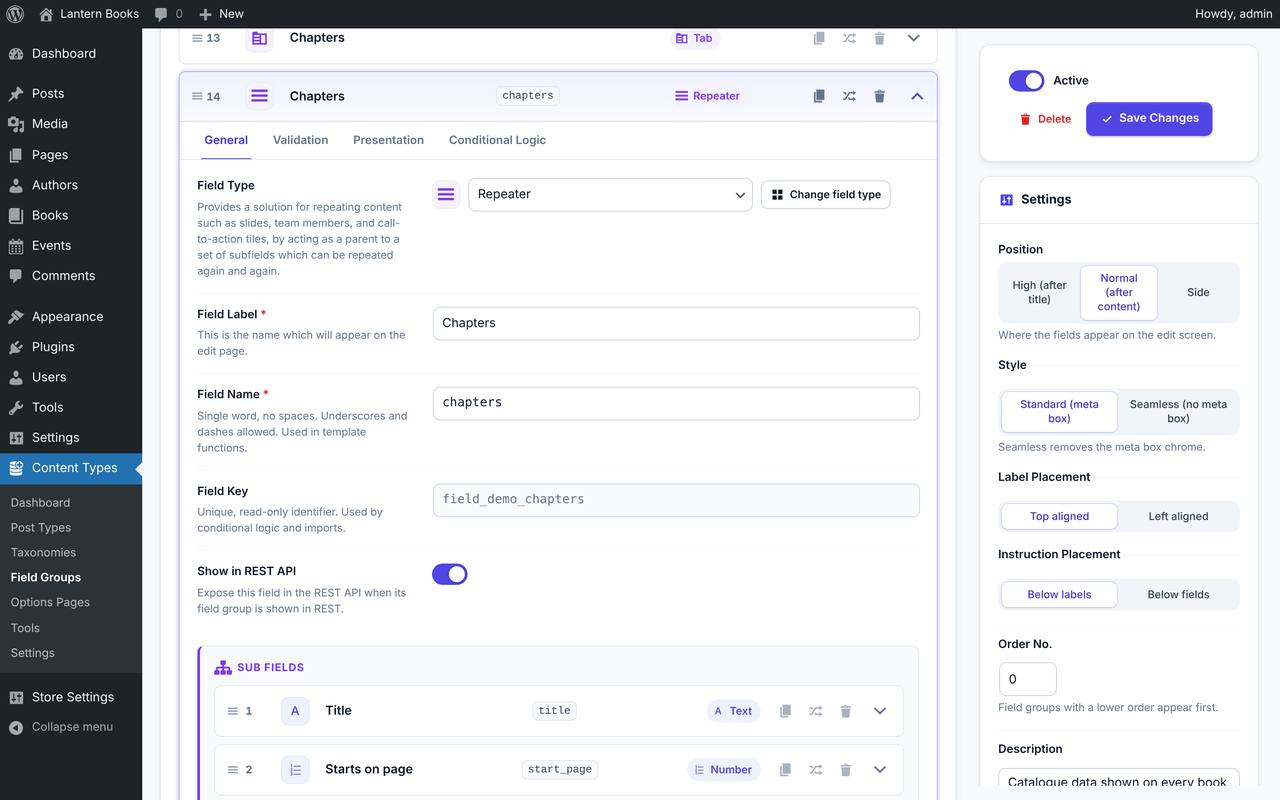
A Repeater holds any number of rows, and each row has the same sub fields. Use it for chapters, speakers, FAQs, opening hours, team members and so on.
Set it up:
- Add a field of type Repeater, labelled for example Chapters.
- Inside it, click Add Sub Field to add sub fields: Title (Text), Starts on page (Number), Free preview (True / False).
- Optional settings:
- Layout: Table (compact columns), Block (stacked) or Row (labels on the left)
- Button Label: for example "Add chapter"
- Minimum Rows / Maximum Rows
- Collapsed: which sub field to show as the row title when a row is collapsed
- Pagination and Rows Per Page: show very long lists a page at a time in the editor
As an editor: click the button (Add chapter) to add a row. Drag rows to reorder. Each row has buttons to Add row above, Duplicate row, Collapse / expand row and Remove row.
In a template:
<?php if ( sgct_have_rows( 'chapters' ) ) : ?>
	<ol>
	<?php while ( sgct_have_rows( 'chapters' ) ) : sgct_the_row(); ?>
		<li><?php sgct_the_sub_field( 'title' ); ?></li>
	<?php endwhile; ?>
	</ol>
<?php endif; ?>