
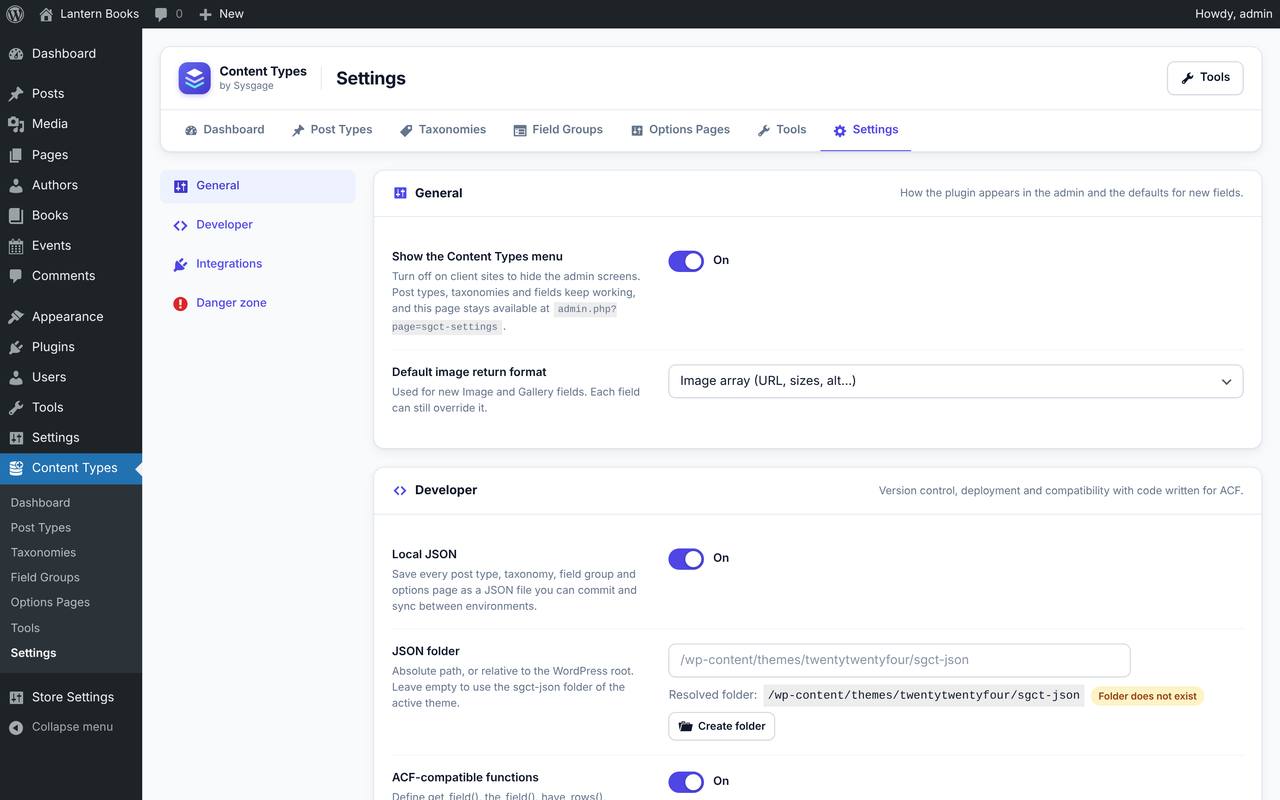
Content Types > Settings has four sections. Change what you need and click Save Settings.
| Section | Setting | What it does |
|---|---|---|
| General | Show the Content Types menu | Turn off on client sites to hide the admin screens. Post types, taxonomies and fields keep working, and the Settings page stays available at admin.php?page=sgct-settings. |
| General | Default image return format | What new Image and Gallery fields return in templates: Image array (URL, sizes, alt…), Image URL or Attachment ID. Each field can still override it. |
| Developer | Local JSON | Save every definition as a JSON file (section 14) |
| Developer | JSON folder | Leave empty to use the sgct-json folder of the active theme, or enter another folder (absolute, or relative to the WordPress root). It must be inside wp-content or a theme folder. Resolved folder shows the folder in use and whether it is Writable; Create folder creates it. |
| Developer | ACF-compatible functions | Provide get_field(), the_field(), have_rows(), the |
| Integrations | REST API | Add the sgct property to REST responses for field groups with Show in REST API on |
| Integrations | Shortcode | Turn the |
| Integrations | Block bindings | Let Paragraph, Heading, Image and Button blocks show field values (WordPress 6.5+) |
| Integrations | Public options pages | Options pages whose values every visitor may see through the shortcode, block and bindings |
| Integrations | Google Maps API key | Needed for Google Map fields (with the Maps JavaScript and Places APIs). Click Show to see the saved key. |
| Danger zone | Delete data on uninstall | When the plugin is deleted, remove every definition and all plugin settings. Your posts, terms and saved field values are never deleted. |
In Danger zone, Reset to defaults restores every setting on the page. Your definitions and field values are not affected.
A setting marked Overridden in code is being changed by your theme or another plugin, so the value you save here may not be the one in use. On multisite, settings marked Network administrators only (Local JSON and JSON folder) can only be changed by network admins.